

The Bobcat UI
bobcat uibobcat ui serves the run board and the Event Model canvas on port 5525 and opens them in your browser, until you press Ctrl+C. The run board shows every Bobcat run on the box, live. The canvas draws your Event Model and colours each slice from the runs of the specifications bound to it.
It is part of the free bobcat tool, under the same MIT license as the rest of Bobcat. Visualizing the model and the specs that prove it is the part of spec driven development that has to be in everybody's hands, so it is.

Installing and updating
The UI ships inside the bobcat global tool. There is nothing else to install:
dotnet tool install -g Bobcat.Console     # first time
dotnet tool update -g Bobcat.Console      # after that
Launching it
bobcat ui                      # serve on 5525 and open the browser
bobcat ui --port 5600          # somewhere else
bobcat ui --no-browser         # serve, but leave the browser alone
Bobcat UI on http://localhost:5525 — the run board at http://localhost:5525/, the Event Model at http://localhost:5525/event-model
Ctrl+C to stop.| Flag | What it does |
|---|---|
-p, --port <port> | the port to listen on; 5525 by default, the address every Bobcat publisher probes |
-n, --no-browser | do not open a browser |
-i, --idle-shutdown | stop by itself after a stretch with nothing connected and nothing publishing -- two hours by default, BOBCAT_MONITOR_IDLE_MINUTES to change it. For a UI nobody is watching |
It is off unless you start it. Nothing about a test run depends on it: see the next section.
Pick a port other than 5525 only on purpose
A publisher looks for the UI at http://localhost:5525 unless BOBCAT_MONITOR_URL says otherwise, so a UI on another port sees only the runs that were told where it is.
How a test run finds it
A Bobcat run -- dotnet test on a spec project, bobcat run, the supervisor, a resident runner -- probes GET /api/ping once at startup with a tight timeout. If something answers, the run publishes its progress there as it goes. If nothing answers, the run publishes nothing for its whole life and is otherwise unaffected.
That is the one rule the whole design hangs on: a test run is never slowed or failed by the UI. Starting bobcat ui halfway through a run does not attach that run; the next one will appear.
| Variable | What it does |
|---|---|
BOBCAT_MONITOR_URL | where a run looks for the UI; http://localhost:5525 by default |
BOBCAT_MONITOR=0 | do not publish at all, not even the probe |
BOBCAT_MONITOR=1 | a console is expected: the probe waits up to 5s for it instead of 250ms (a resident runner sets this on every child) |
BOBCAT_RUN_TAG | an opaque label stamped on the run -- a ticket, a build number -- and shown with it |
The full publisher vocabulary is in What a Run Publishes.
The run board
The home page, at /runs. A card per run, newest first, with its repository, branch and mode, its counts, and its age.
- Steps stream in for the scenario in flight: step n of N with elapsed time, row k of M for a table, and the interim message of a step that is polling.
- Retries and flakiness are reported honestly. A pass on a retry is counted and shown as one, never folded into a clean pass.
- A supervised run shows its topology: the lanes and what each was handed, what is running in each right now, recycled resources, worker faults with their exit code and standard error, stalled tests, and peak worker memory when sampling is on.
- Foreign suites count too. A supervised run of a plain xUnit or TUnit suite that publishes no scenarios of its own still gets per-test progress, forwarded by the supervisor in the framework's own words -- Passed, Failed, Skipped and so on.
- Orphans render as orphans. A run whose process died without finishing is marked orphaned rather than "running" forever.
- Several repositories on one box are told apart by a repository filter, and a supervised run across several worker processes is one card, not one per worker.
- A project that no longer compiles says so, above the cards and on its runs' pages, with its first compiler errors:
bobcat watchreports each rebuild to the UI, and so doesstoat runnerfor a resident runner it rebuilds. Until the build is fixed, the runs below are of the code before the change that broke it.
Each scenario has a page of its own at /runs/{runId}/specs/{Feature}/{Scenario} -- a URL you can paste into a pull request -- that renders the specification the test produced: each step with its verdict and duration, each named comparison judged on its own (✗ count: expected '12', got '0'), tables as grids, and an exception in a panel at the foot of the page with Bobcat's filtered frames.
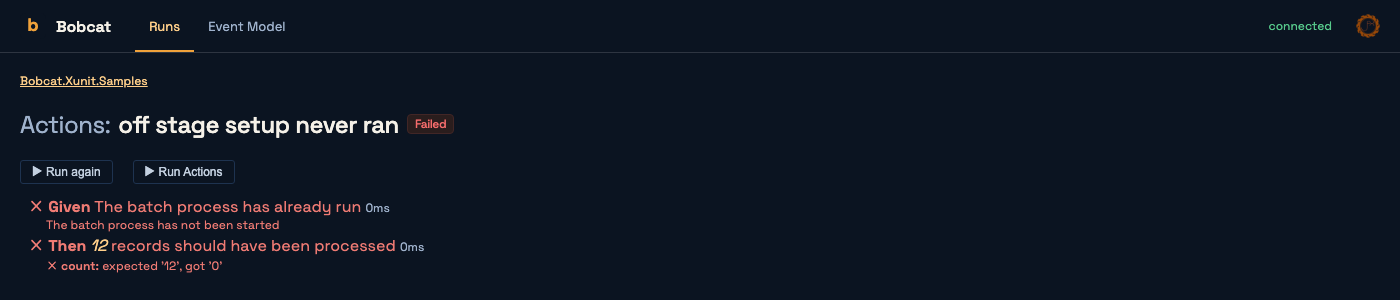
Run buttons
The Run again, Re-run failed, Run feature and (on the canvas) Run this slice buttons work when a resident runner is attached for that suite:
bobcat resident ./artifacts/MySpecsA runner registers what its suite specifies, and the buttons send it the identities to run, cold (a fresh test host on the current code) or warm (a test host kept open between runs). With no runner attached, the button says how to start one.
The board lists every attached runner above the run cards, before anything has run, with its state and a Run all button that runs its whole project. A runner's name opens its page, at /runners/{runnerId}: every specification it can run, by feature, with the steps each one plans, and a run button for each feature and each specification. It is the UI's bobcat preview, and like it shows templates ({amount}) rather than values, because nothing has run. A run page's Run again runs every specification that run ran, whatever happened to them. Over the API, a command can name "all": true in place of specs or feature: the UI resolves it to every identity the runner registered.
A run a button started says so on its card -- Run 2 in feature Bank · warm · from bobcat-ui, or Run all -- and while it runs, how many scenarios have finished of the specifications it selected. The board keeps the latest finished runs of each suite (BOBCAT_MONITOR_RETENTION_RUNS, 10 by default), so pressing buttons can evict the run a page is open on. That page then says the run was evicted and where its archive is, rather than calling it unknown.
A resident runner relaunched on a rebuild registers again but runs nothing, so the UI follows it in three ways. The latest run of its suite is marked from before the last rebuild (the runner says when its host was built). Specifications it no longer has are dropped from the canvas's slices (a new one reaches the canvas with the next run). And pressing Run on an earlier run's page for a spec renamed since says the runner no longer has it, instead of blaming another suite. Re-running on a rebuild automatically is not done: a run nobody asked for costs a database and a CPU.
Exports
Every card exports its run, and so does GET /api/runs/{runId}/export?format=…:
| Format | |
|---|---|
| CTRF | the default and the richest -- retries, attempts, flakiness and steps all have fields of their own |
| JUnit XML | lossy, for the CI systems that ingest nothing else |
| NDJSON | the raw event stream the run published, exactly as it arrived |
The Event Model canvas
At /event-model. The canvas draws the Event Model -- chapters, slices, and each slice's trigger, command, aggregate, events, read models and external systems in the usual lanes -- with the same @jasperfx/event-model-vue renderer CritterWatch uses, so a model looks the same in both.
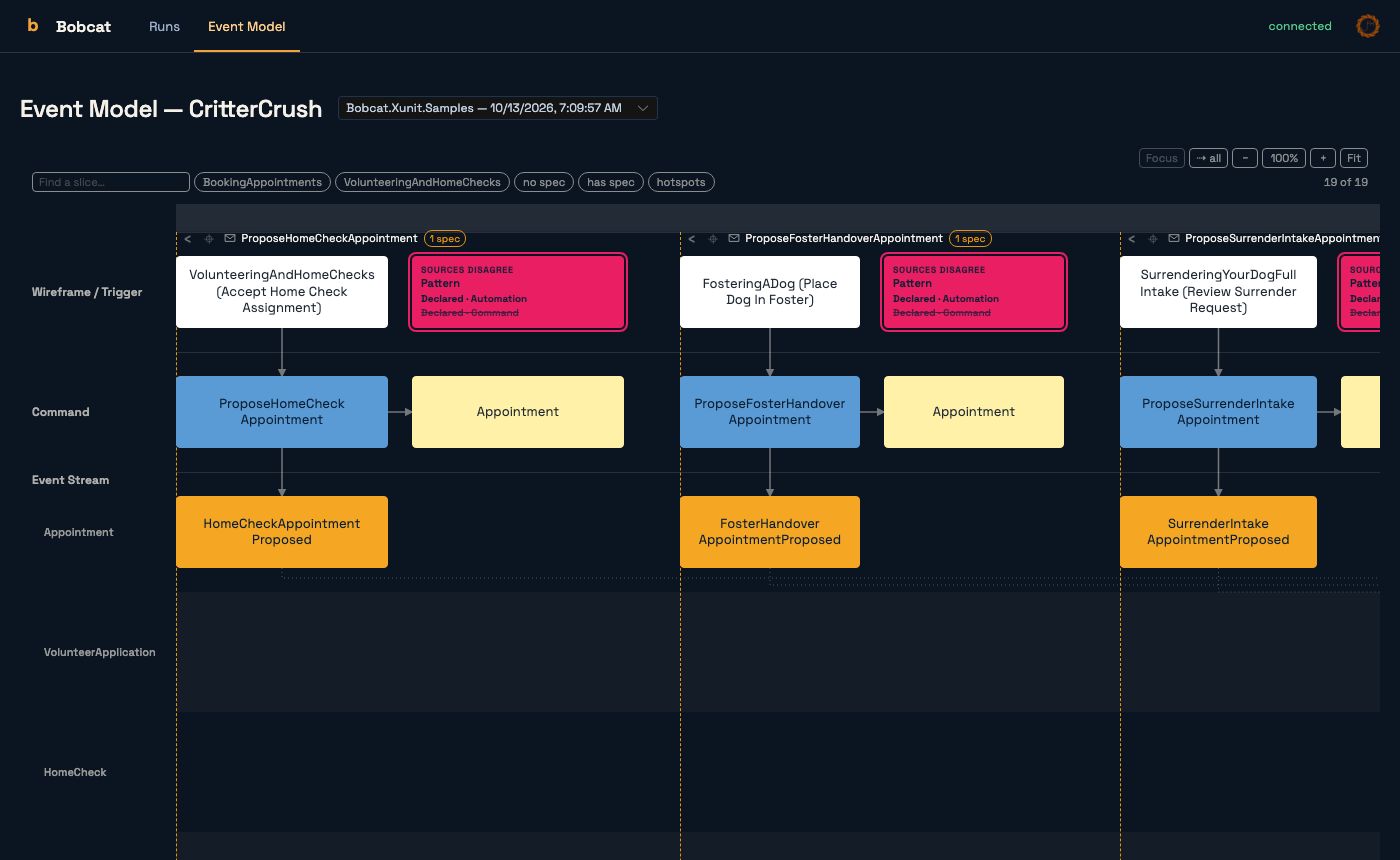
Getting a model onto it
The canvas holds whatever has been pushed to it, merged by model name, so several sources can each contribute what they can see.
From a running Wolverine application, which can describe its own model:
dotnet run --project src/MyApp -- event-model --url http://localhost:5525/api/event-modelLive, as you edit. watch-event-model rebuilds the application on each change and pushes the model again, and starts a bobcat ui (with --no-browser --idle-shutdown) if none is answering:
bobcat watch-event-model src/MyAppFrom an eventmodelers.ai board, while you import it:
bobcat import-event-model board.yaml --url http://localhost:5525From a spec run. A run that finds the UI publishes the model its specifications declare, under a source named for the spec assembly, with the same never-slow-never-fail rule as everything else it publishes.
Reading it
- Slices are coloured from a run. Pick a run from the selector at the top -- the newest by default -- and each slice takes the colour of its bound specifications' outcomes in that run. A specification that did not run there, and a slice with none bound, are drawn in the orange of drift.
- Hotspots mark what needs a decision: a specification declared but still pending, or sources disagree -- two sources describing the same slice differently, shown with both claims.
- Click a slice to open its drill-down: each bound specification with its outcome and a link to its rendered page, and the types the scenario actually touched, with any the model does not declare called out.
- Find a slice by name, filter to a chapter, to slices with or without a spec, or to hotspots, and zoom, fit or focus.
The links go both ways: a scenario bound to a slice links to that slice on the canvas, opened on that specification and coloured from that run.
Where it keeps things
Run history and Event Model documents live under ~/.bobcat/monitor/runs -- BOBCAT_MONITOR_DATA moves it. Each run is one NDJSON file of the events it published, and each model source is one event-model.{source}.json. A restarted UI replays them, so the board comes back as it was.
Two settings bound two different things:
| Variable | Default | What it bounds |
|---|---|---|
BOBCAT_MONITOR_RETENTION_RUNS | 10 | the board, counted per repository and suite. A run evicted from the board is ejected: its file moves to ejected/ and stays there |
BOBCAT_MONITOR_RETENTION_DAYS | 14 | the archive, by age. The only thing that ever deletes a file |
Zero or a negative number turns either one off. The Eject button on a card does by hand what the board limit does automatically, and a live run is never ejected.
The same four settings also read as configuration keys, Monitor:DataPath, Monitor:RetentionRuns, Monitor:RetentionDays and Monitor:IdleMinutes, which win over the variables when both are set. For the global tool the environment is the practical way to set them, so the variables above are the spellings to use.
Querying it from the command line
The same runs and model are readable as JSON from the bobcat tool, which is how an AI agent reads them: bobcat failing-tests, bobcat failing-spec, bobcat slice-coverage and the rest. See Querying Runs from the Command Line.
For a run kept as a file rather than watched live -- a CI artifact, say -- see the JSON results file and the HTML results page, which renders a scenario with the same components the UI uses.
Troubleshooting
"Could not listen on http://localhost:5525 … Something else holds the port." Another bobcat ui is running, or a Stoat host, which also binds 5525 today. Stop the other one, or run this one with --port and point publishers at it with BOBCAT_MONITOR_URL. To see what holds the port:
lsof -i tcp:5525 # macOS and LinuxA run never appears. The probe happens once, at the start of the run, so a UI started afterwards misses that run. Check that BOBCAT_MONITOR is not 0 and that BOBCAT_MONITOR_URL, if set, names this UI.
The canvas says there is no model. Nothing has pushed one yet: use one of the sources above.
Slices stay uncoloured. The selected run has no scenarios whose identities the model's slices bind. Pick a run of the spec suite that binds them, and see Spec Identities for how the join works.